In private testing · Launch November 1st, 2026 · Linux and Windows · Mac in first outside tests
ProxiLoop™by AetherMindForge
Join the waitlist

An app on your computer for building software with two AIs.

ProxiLoop: One AI builds. A different AI checks.
You decide.

ProxiLoop puts two AI assistants from two different companies to work on your project. You approve the plan, and you decide when the work is finished.

A desktop app for Windows and Linux. Mac in first outside tests.

Made to be simple for any level of AI experience, from a few days in and up.

BuilderAI ReviewerAI You decide
Why two different AIs

An AI checking its own work tends to miss its own mistakes. A different one catches more.

ProxiLoop is built for the builder and the reviewer to be different AIs, made by different companies. Only have one AI? You can start with it. It plans, builds and reviews its own work, and it still catches real problems.

ProxiLoop works best when you add a second AI from a different company, because it can catch the mistakes the first one tends to miss.

01

The reviewer didn't write it

An AI checking its own work tends to agree with itself. The reviewer reads the plan and the work fresh, with no stake in either being right.

02

Different companies, different habits

Two AIs from the same maker tend to share the same mistakes. A reviewer from a different company looks at the work differently.

03

Problems caught early

The plan is reviewed before any work starts, when a wrong idea is still only words. The finished work is reviewed again.

04

"Done" has to be shown

An AI reporting on its own work tends to round up. The reviewer checks those claims against the actual work and the test results.

From my own build

I once used up my reviewer AI's usage before the month was over, and I needed to keep building. For five days, I used the same AI as both my builder and my reviewer. It still caught real problems, even though it was checking its own work.

When my usage came back, the second AI's very first review caught a kind of mistake the same-AI reviews had not been catching.

How it works

Every piece of work follows the same six steps, by default.

  1. 1 · PlanBuilder

    Writes a plan for the work you asked for.

  2. 2 · Plan reviewReviewer

    Points out problems before anything is built.

  3. 3 · LockYou

    Approve the plan.

  4. 4 · BuildBuilder

    Does the work in the locked plan.

  5. 5 · Build reviewReviewer

    Checks the finished work against the plan.

  6. 6 · ShipYou

    Decide when the work is done.

Plan review and Build review are on by default. You can switch either one off for the whole project, and the builder asks before each ticket whether it needs a plan review. Lock and Ship stay yours either way.

The builder is an AI such as Claude Code. The reviewer is an AI from a different company, such as Grok Build. Lock and Ship are yours. The AIs are set up to wait for you.

Every plan, review and decision is kept in your project, and ProxiLoop shows you the step each piece of work is at.

Proof, from my own build
137+

issues caught by the reviewer while building ProxiLoop itself.

95 of them were in plans, caught before any code was written.

That is why the plan is reviewed first: a problem fixed in the plan never has to be fixed in the code.

95caught in plans, before any code
42caught in finished work, before it shipped
One dot per issue. Counted from the reviewer's own review files, as of October 2026. Older reviews that gave no count are not included, so the real number is higher.
Also from the same build
621decisions saved, each with the reason it was made
147lessons written down from things that went wrong, so they don't happen twice
What's inside

Everything for one project, on one page.

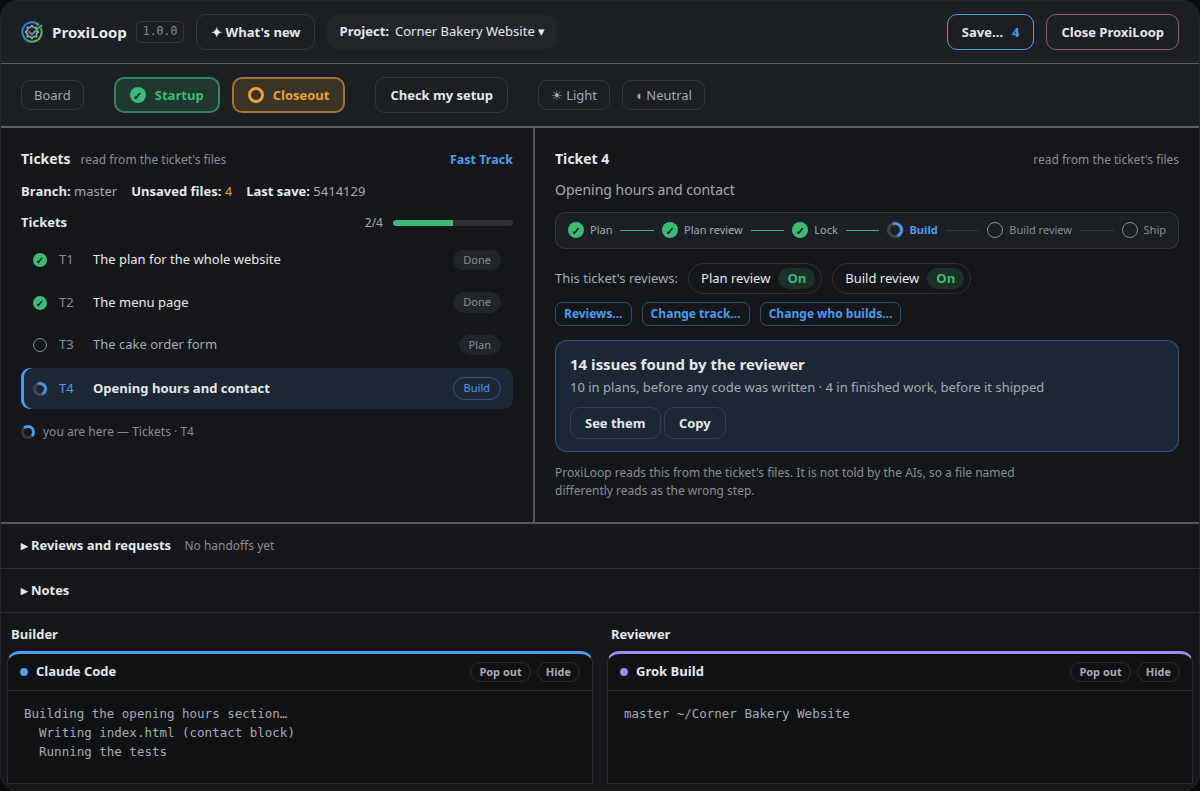
Your tickets and the step each one is at, what the reviewer has found, and the two AIs' own windows side by side, where you talk to them directly.

How the page will look at launch · the approved design, on a practice project How ProxiLoop's page will look at launch, with a practice project
Start from an idea

Describe it. The builder asks a few questions, then writes the first plan.

I want a page where customers can book a table.
1. Will you take payment when they book? 2. How many tables, and what hours?
No payment. Ten tables, 5 to 10 pm.
Here is the first plan, for you to look at before anything is built.
The setup screen

See what is missing, and install it from there.

Each company's own installer, started for you.

Claude Code ✓ ready
Grok Build ✗ missing · Install
git, and your name for saves ✓ ready
Save

Save shows every changed file, and keeps password files out.

3 changed files ✓ ticked
1 new file ✓ ticked
1 file that looks like it holds passwords ✗ cannot be ticked

Untick anything that isn't ready yet.

Two tracks

Fast Track or Disciplined, chosen when the project starts.

Fast Track: every ticket gets a plan review and a review of the finished work.

Disciplined adds a review before and after each bigger group of work.

You can switch either review off for the whole project, and the builder asks before each ticket whether it needs a plan review. Lock and Ship stay yours either way.

Who's behind it

Built by a non-programmer, the same way you'll use it.

I'm Saul, a Navy veteran and former telecom project manager with no programming background.

ProxiLoop was born from a working process I made up myself and used to build my first app, a bookkeeping app for SMEs that is still in development.

One AI built, a different AI reviewed, and I made every decision.

ProxiLoop itself was built this way: Claude Code built it, Grok Build reviewed it, and I directed the build.

Questions

Short answers.

Do I need to know how to code?

No. It's made to be simple for any level of AI experience, from a few days in and up. Start from an idea: the builder asks a few questions and writes the first plan. You approve the plan and decide when the work is done.

What do I need?

A computer running Linux or Windows (the Mac is in its first outside tests), and your own accounts with the AIs. Claude Code and Grok Build work today. Planned: OpenAI Codex CLI, Gemini CLI, GitHub Copilot CLI, and OpenCode running open-source models through OpenRouter.

Can I use just one AI?

Yes. One AI can do both jobs, and it still catches real problems. ProxiLoop works best with two from different companies, because the second one can catch what the first one misses.

Does my project leave my computer?

ProxiLoop itself sends none of your work anywhere. The AI programs send what you ask of them to their own companies, as they do whenever you use them.

Is ProxiLoop made by one of these AI companies?

No. ProxiLoop is made by AetherMindForge. None of the AI companies named here made it, sponsors it or endorses it.

Private testing now · launch November 1st, 2026

Join the waitlist.

I'll email you when ProxiLoop launches.

Your email is used only to tell you when ProxiLoop launches. Never shared or sold.

Pricing: coming soon.

Questions? Email me, I read every message: hello@proxiloop.com